
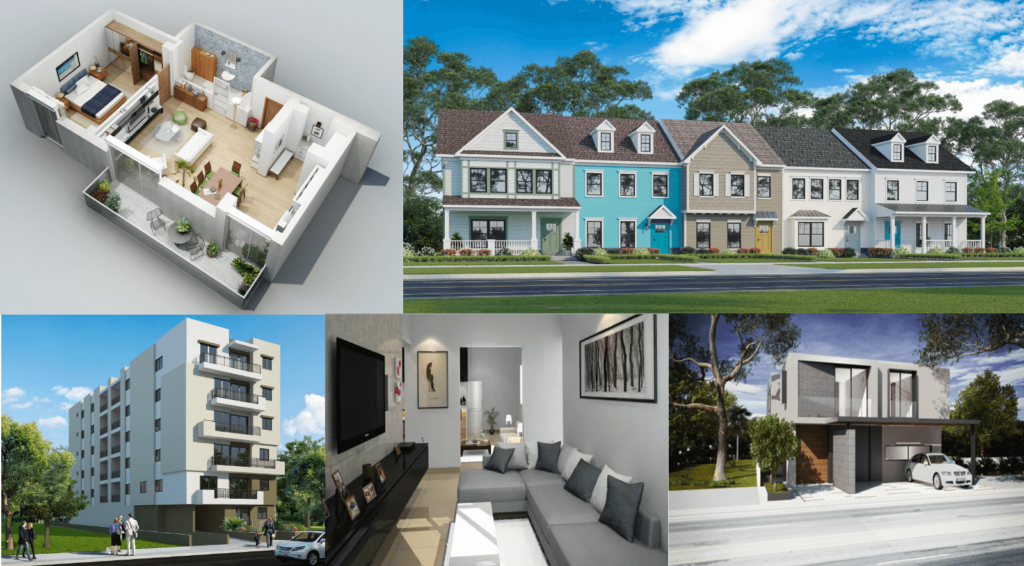
Real estate agents and brokerages sell what buyers can picture. That is easy with a finished, well-staged home and much harder with a pre-construction condo, an empty house, a dated fixer-upper or a vacant lot. 3D rendering closes that gap: it produces photorealistic images, floor plans and tours that show buyers what a property is, or what it can become, before they ever visit.
This guide is written for listing agents, broker teams and new-development sales offices. It covers which kinds of listings benefit most, which deliverables to order for each, what to send your rendering studio, and the disclosure rules to follow so renders help a sale rather than create problems later.
Request a free quote for real estate rendering
Which Listings Benefit Most From 3D Rendering
| Listing type | The buyer’s problem | What rendering shows |
|---|---|---|
| Pre-construction condo or townhome | There is nothing to tour yet | Exteriors, model units, amenities and views, so units can sell off-plan |
| Vacant or empty home | Empty rooms look small and cold online | Furnished interiors that show scale and how rooms can be used |
| Dated home or fixer-upper | Buyers cannot see past old finishes | An “after” version with a renovation concept, shown next to the real photos |
| Vacant land or teardown | A lot is hard to value without a building | A possible home or project on the site, with the real surroundings |
| Commercial or mixed-use space | Tenants cannot picture their fit-out | Office, retail or restaurant layouts and storefront signage |
For land in particular, see our guide on selling vacant land with 3D renderings. If you are weighing rendered staging against renting furniture, compare the options in virtual vs physical staging.
The Deliverables Agents Use Most
Exterior renders
The listing’s lead image for anything not yet built: the front elevation, a street view and, for larger projects, an aerial showing the neighborhood. A well-composed dusk exterior often becomes the image used on signage and portals. See our exterior rendering service.
Interior renders and model units
Living room, kitchen and primary bedroom are the rooms buyers look at first. For new developments, a rendered model unit can stand in for a physical show unit until one is built. See our interior rendering service.
3D floor plans
A 3D floor plan shows layout, furniture scale and flow far more clearly than a 2D plan, and works especially well in listing galleries. Read why 3D floor plans outperform 2D plans.
Walkthroughs and 360° tours
Useful for out-of-town buyers and high-value listings. A short 3D walkthrough animation works on social media and listing pages; 360° and VR tours let buyers look around each room at their own pace. More in the benefits of 3D video walkthroughs.
Aerial and site views
For larger lots, communities and commercial sites, an aerial render explains location, access and nearby amenities in one image. See why bird’s-eye renders work in real estate marketing.
A Starter Package by Listing Type
| Listing | Typical starter package |
|---|---|
| Single pre-construction home | 1 to 2 exteriors, 2 to 3 interiors, 3D floor plan |
| Condo or townhome project | Hero exterior, aerial, amenity views, model-unit interiors, 3D floor plans for each unit type, optional walkthrough |
| Vacant resale home | Rendered staging of 3 to 5 key rooms based on the listing photos |
| Fixer-upper | 1 exterior and 2 to 3 interior “after” concepts, shown next to current photos |
| Vacant land | 1 to 2 exterior concepts on the actual site, plus an aerial |
For larger new-development campaigns, see how renders support off-plan sales in pre-construction condo marketing and how 3D rendering helps developers sell faster.
What to Send Your Rendering Studio
- Plans: floor plans and elevations (CAD or PDF). For resale listings, a measured floor plan or a set of room dimensions.
- Photos: current listing photos and, for exteriors, photos of the street and neighboring houses.
- Finishes and style: the target buyer and a few reference images (modern, transitional, coastal, and so on). For new builds, the builder’s finish schedule.
- Views to include: which rooms or angles matter most, and where the images will be used (MLS, portals, print, social).
- Deadline: the listing launch date, so the studio can schedule drafts and revisions.
Timelines depend on the number of views and how complete the inputs are; see how long 3D rendering takes and what drives 3D rendering cost.
Disclosure and Accuracy Rules
Renders should help buyers understand a property, not mislead them. Follow these rules on every listing:
- Label rendered images. Mark images as “virtually staged” or “artist’s rendering”. Most MLS systems and portals have rules on this; check yours before uploading.
- Do not hide defects. Rendered staging should not remove or cover permanent features such as damage, power lines, neighboring buildings or views.
- Show the real property alongside the render. For vacant and fixer-upper listings, include the current photos so buyers can see both.
- Match the real specification. For new builds, render the finishes actually included in the price, and label upgrades as optional.
- Use accurate scale. Furniture and rooms should be modeled to real dimensions so rooms do not look bigger than they are.
Getting the Most From Renders in Your Marketing
- Use the strongest render as the first image on the MLS and portals, then mix renders with real photos.
- Crop vertical versions for Instagram and Reels, and use the walkthrough as a short social video.
- Put 3D floor plans in the brochure and the listing page, where buyers compare layouts.
- Bring renders to listing presentations: they help win the listing as well as sell it.
Frequently Asked Questions
Is 3D rendering worth it for a resale listing?
It is most useful for vacant homes, dated homes and listings that buyers find hard to picture. For a well-furnished home in good condition, professional photography is usually enough.
What is the difference between virtual staging and 3D rendering?
Virtual staging adds furniture and decor to photos of real, existing rooms. 3D rendering builds the whole scene from plans, so it also works for properties that do not exist yet or are being renovated.
Do I have to disclose that images are rendered?
Yes. Label rendered or virtually staged images clearly and follow your MLS and portal rules. Include current photos as well so buyers can see the real condition.
Can you render from listing photos only?
For rendered staging of existing rooms, yes. For new exteriors or renovation concepts, plans or at least room dimensions are needed for accurate results.
Which images should I order first?
Start with the views buyers see first: the front exterior, the main living area and the kitchen, plus a 3D floor plan. Add walkthroughs or aerials for higher-value or larger listings.
Conclusion
For agents and brokerages, 3D rendering is a practical tool for the listings that are hardest to sell from photos: projects not yet built, empty homes, fixer-uppers and land. Order the views buyers look at first, send complete inputs, and label every rendered image clearly. For market-specific advice, see our city guides for Houston, Dallas and Los Angeles. See our portfolio or request a fixed quote for your next listing.